What's New
The latest features, improvements, and fixes to Courtogo. We ship updates regularly to make court booking better for everyone.
Chat: Venues Can Turn Messages Off
Chat suits a venue with somebody at a desk. If yours is run by one person who spends the day on court, an unanswered thread reads worse than no thread at all — so you can now turn messages off for a venue, from Message settings at the top of your Messages inbox. Players then see your phone number, email and social links on the Chat tab instead of a message box, so a question still reaches you by the route you actually watch. Conversations already open stay exactly where they are, and you can still reply to them — nobody who asked something yesterday is left hanging. Nothing is deleted, and you can switch messages back on at any time. Only the venue's owner can change this, not managers or staff.
Chat: Read Receipts & Booking References
Two additions to chat. The newest message you send now says Sent underneath, and turns to Seen the moment the other side opens the thread — so a customer waiting on an answer, or a venue replying late at night, can tell the difference between unread and ignored. And a booking reference typed into a message — like #2ad6be12, the code on your confirmation, receipt, or booking email — becomes a tappable chip that opens the booking: date, time, court, status, and total, without leaving the conversation. It works with either code a booking carries, and a reference only opens for the person it belongs to: a booking made by that customer at that venue. Anything else stays as plain text.
Chat: Message a Venue Before You Book
Players can now ask a venue a question without leaving the booking page. Open the new Chat tab on any venue and type — parking, paddles to borrow, whether the courts are covered, anything the listing doesn't answer. It takes the slot of the old Open Play tab, which had been showing a placeholder while that feature is rebuilt. Replies arrive live, with an unread count on the tab, on the message icon in the top bar, and in Messages. For venues: every thread from every venue you work at lands in one Messages inbox in your dashboard, newest first, with a venue filter once you run more than one — so a question waiting on an answer is never hidden behind the venue switcher. Your team can answer too — manager or staff alike, so a question doesn't sit waiting for you. And because a thread can carry a phone number, or a complaint about the very person reading it, you can keep anyone out of it: turn off Read customer messages for that person on your Team page.
Financials: Downloadable Statements & Daily Player List
Two big additions for tracking your money and your day. On Financials you can now download a CSV statement — pick a specific payout cycle, a custom date range, or your full history — with customer name, booking date & time, payment date, and payout, sorted oldest to newest like a bank statement. Refunds and clawbacks are broken out as their own lines so each cycle reconciles to the exact amount that reached your account. If a booking you were already paid for gets refunded, it now shows as “Refunded this cycle” and the deduction appears on the payout it's actually recovered from — so the numbers finally match your GCash/bank. Separately, on Manage Bookings you can now export a daily player list: choose a date and download everyone booked that day with their name, phone, court, time, and payment status — perfect for front-desk check-in and catching no-shows or double bookings.
Custom Date Pricing: Special Rates for Specific Dates
You can now set special prices for specific date ranges — like a holiday week, a long weekend, or a tournament stretch — that override your normal rates for those days. Set it up in My Venues → Edit → Pricing: choose the dates, apply it to all courts or a single court, and enter the price. It's the highest-priority rate, so it takes precedence over your weekend, holiday, and peak-hour pricing on those dates. Need it to vary by time of day? Add optional time windows within the range (for example a higher evening rate), and any hours you don't cover fall back to the range's default price. One thing to note: customers can't reschedule onto a pricier date or time for free — moves that would cost more than they originally paid are blocked, while same-price or cheaper moves still work as usual.
Cash Payments: Let Customers Pay in Person
Manual-payment venues can now let customers reserve a slot and pay cash in person instead of uploading online payment proof. Turn it on in My Venues → Edit → Payment — it's off by default, and enabling it asks you to confirm since it carries some risk. When it's on, customers choose between Pay Now (the usual screenshot flow) and Pay Cash in Person at checkout. A cash booking reserves the slot right away and stays pending until you confirm it from your dashboard (you get an in-app and email notification for each one). Unlike online bookings, cash reservations are not auto-cancelled after 30 minutes, so review and confirm them promptly — and be aware that customers with malicious intent could reserve slots without ever paying or showing up.
New: Custom walk-in titles
When creating a walk-in booking, you can now set an optional Slot Title — like “Coaching” or a group's name — that shows on your schedule in place of the generic “Booked”. The title appears everywhere your schedule is shown, including the public venue calendar and shared schedule images. Leave it blank to keep showing “Booked” as before.
New: Financials
See your true earnings for every payout cycle. The new Financials page in your sidebar groups all confirmed bookings into your twice-weekly payout cycles (Mondays & Thursdays), breaking down online bookings (paid out via Courtogo) separately from walk-in cash collected at the venue — plus add-ons, discounts, and refunds — into a clear net total per cycle. Each cycle shows a status badge (Paid out, Processing, or when it pays next), and it's built mobile-first so it's easy to read on your phone.
Venue QR Codes
Turn any venue page into a scan-to-book QR code. Open the share menu on your venue's booking page and choose Generate QR Code to create a branded QR that links straight to your booking page — with your venue logo centered and Courtogo colors. Download it two ways: a polished branded card ready to post or print, or the QR code only to drop into your own posters, tarpaulins, and signage. Great for putting on your counter, court walls, or flyers so players can book in one tap.
End Dates for Recurring Blocks (and Editable Blocks)
When you block time slots on a repeating schedule — every day or certain days of the week — you can now choose when the recurrence ends: after 1 week, 1 month, 2 months, a custom date, or Never (the previous behavior). Perfect for seasonal closures, maintenance windows, or leagues that run for a fixed stretch. You can also now edit an existing block instead of unblocking and recreating it — tap a blocked slot and change its reason, schedule, repeat days, or end date in place. Available on any booking grid and from the Block Slots page in your dashboard.
Fast Payouts: Automatic, Twice a Week for Every Venue
We're making payouts faster and more reliable for everyone. Because of the high volume of transactions flowing through the platform, sending a separate transfer for every single booking was getting flagged and rate-limited — so we've paused per-booking transfers for now. In their place, your Fast payouts are now sent automatically twice a week, every Monday and Thursday. Each run bundles all of a venue's confirmed online bookings into a single transfer, so as long as your payout details are complete, you're paid on the very next run with no weekly waiting period and still no extra fees. You can watch each batch move from Scheduled → Processing → Sent right on your payouts page, and if a transfer ever bounces (e.g. a payout detail needs fixing) we flag it there and automatically retry it on the next run. Larger payouts are handled too — bank transfers above ₱50,000 are sent over PESONet automatically. Refunds: once a booking has been paid to you in a Fast payout, refunds for it are handled by you and your managers using the same easy refund flow (you're holding the funds); if a refund is issued before that booking's payout run, it's simply left out of the batch and never paid. Important: venues that haven't completed their payout details — for example, bank-transfer venues that haven't selected a bank — can't be paid automatically and fall back to manual payouts, which are much slower. To avoid delays, open your payout settings and make sure your payout method, account details, and bank (if applicable) are all set. Visit How Payments Work to learn more.
Add-ons: Sell Rentals and Extras at Checkout
You can now offer add-ons to customers during checkout — paddle rentals, refreshments, towels, gear, anything. Configure each item as a flat price (e.g. ₱50 per paddle) or per-hour (e.g. ₱50 / paddle / hour), set optional stock to prevent overbooking across overlapping time slots, and cap max per booking if needed. Customers see them in a clean add-ons section on the checkout page and on your venue's About tab; you see them on every booking detail and in your owner notification emails so staff know what to prep. Manage add-ons from the new Add-ons page or during venue setup in the wizard. Add-ons also work in walk-in bookings.
Auto-Payments Now Available
Auto-payments are rolling out to all venues! Bookings will be confirmed automatically when customers pay online via GCash, Maya, GrabPay, or QR Ph through PayMongo — no more verifying screenshots manually. Your first payout arrives about 2 weeks after auto-payments activate for your venue; after that, payouts are sent every Monday for the previous week's confirmed bookings, with no platform fees deducted — you keep 100% of your listed prices. (Customers pay a small service fee at checkout, always shown before they pay.) You can keep using manual payments for the next 30 days while you transition. After that, your venue will automatically switch to auto-payments — just accept the terms and add your payout details (GCash, Maya, or Bank Transfer) from My Venues to switch sooner. Visit How Payments Work to learn more.
Booking Grace Period for Late Customers
Customers can now book a time slot a few minutes after it has already started — great for last-minute extensions when players are still on the court and decide to stay longer. Pick a grace period of 10, 15, or 30 minutes per venue. The default is 0 (slot locks the moment it starts), so existing venues are unaffected until you opt in. To configure it, go to My Venues → Edit → Basic Info → Advance Booking Window → "Booking grace period."
Show Booking Names to Public Viewers
You can now let public viewers tap a booked time slot on your venue calendar to see who reserved it. Off by default for privacy. To enable, go to My Venues → Edit → Basic Info → Booking Privacy, and turn on "Show booking names to public viewers." Owners and managers always see full booking details regardless of this setting.
Venue Card Header Image
Venue cards now display a full-width header photo at the top, giving players a preview of your courts and facilities at a glance. Venue owners can choose which gallery photo to use as the default header image — go to My Venues → Edit → Photos, hover over a gallery photo, and click "Set as Header." If no header is set, the first gallery photo is used automatically.
Venues Near You
The home page now shows a "Venues Near You" section that sorts venues by distance from your current location. Enable location access with one click to see which courts are closest to you, complete with distance badges on each venue card. Your preference is remembered so you don't have to enable it every visit. Note: venues must have a Google Maps link set in their profile for distance to be calculated.
Automated Payments: Testing Complete, Launching Soon
Our early testing of automated payments has been a success! We'll be rolling it out to all venues soon. With automated payments, bookings are confirmed instantly when customers pay via GCash, Maya, GrabPay, or QR Ph through our payment partner PayMongo. Your first payout arrives ~2 weeks after activation, and after that venue owners receive weekly payouts every Monday with no platform fees — you keep 100% of your listed prices. (Customers pay a small service fee at checkout, always shown before they pay.) Visit our How Payments Work page to learn more about what to expect. We'll notify you when it's enabled for your venue.
Advance Booking Window Setting
Venue owners can now control how many weeks in advance customers can book. To configure it, go to My Venues → Edit Venue → Basic Info step, and look for the "Advance Booking Window" section. The default is 2 weeks, matching the previous behavior. The booking calendar arrows and date picker enforce the configured limit automatically.
Coming Soon: Automated Payments
We're rolling out automated payments! Bookings will be confirmed automatically — no more manually checking payment screenshots. Customers pay instantly via QR Ph, GCash, Maya, and GrabPay for a hassle-free experience. No fees will be charged to venue owners. Update: Early testing has been completed successfully — see the latest update above.
Walk-in Booking Price Override
Venue owners can now manually override the total price when creating a walk-in booking. An optional "Total Price Override" field appears in the walk-in confirmation dialog. When set, the overridden amount is used instead of the auto-calculated price, with the original shown as a strikethrough for reference.
Reschedule Policy & Approval Flow
Venue owners can now configure per-venue reschedule rules: require approval before a customer's reschedule takes effect, set a minimum number of hours before the booking start, and limit how many times a single booking can be rescheduled. When approval is required, customers submit a request and the booking stays at its original schedule until the owner approves or rejects it from the new Reschedule Requests page.
Dedicated Reschedule Requests Page
A new "Reschedule Requests" page in the owner dashboard shows all pending customer reschedule requests with a side-by-side comparison of the current vs. proposed schedule, including date, time, court, and price changes. Owners can approve or reject each request with one click. A badge in the sidebar shows the count of pending requests.
Reschedule to a Different Court
Customers can now choose a different court when rescheduling a booking — not just a new date and time. The reschedule dialog loads all active courts for the venue so customers can pick any available slot across all courts.
Block Slots from Booking Grid
Venue owners and team managers can now block time slots directly from a booking grid — just select the slots you want to block by clicking or dragging, add an optional reason, and hit Block. No more entering dates and times one by one. Available from the new "Block Slots" page in the dashboard sidebar.
Booking Details Modal from Booking Table
Venue owners can now click on any booked slot directly in the booking table on their venue page to open a detailed modal showing booking info, customer details, pricing breakdown, time slots, payment proof, and status history.
Booking Management Actions
Venue owners can now reschedule bookings, transfer them to a different court, add hours, edit customer details, and cancel bookings — all from the booking details modal or the manage bookings tab in the dashboard.
Pay-First Booking Mode
Venue owners can now enable a "Require Payment First" option in venue settings. When enabled, customers must upload payment proof on the checkout page before their booking and time slots are created. This prevents slot squatting and ensures only paying customers reserve court time.
Venue Waiver / Terms Form
Venue owners can now enable a waiver or terms form in venue settings. When enabled, customers must read and accept the terms in a popup before their booking is created. Acceptance is timestamped on the booking.
Open Play Court Assignment
Open play sessions can now be assigned to a specific court. When a court is designated for open play, those time slots are automatically blocked from regular bookings on the booking table.
Cancellation Note for Venue Owners
When rejecting or cancelling a booking, venue owners can now include an optional note or reason that is relayed to the customer via the cancellation email.
Booking Status Audit Log
Every booking status change is now recorded with a full audit trail — who made the change, how (manual, auto-confirm, walk-in, webhook, timeout, or customer), and why. Venue owners and admins can expand a "Status History" timeline on each booking card.
Admin Walk-in Booking
Admins can now create walk-in bookings for any venue from a dedicated page in the admin dashboard, with optional customer name, email, and phone number fields.
Admin Bookings Dashboard
Admins now have a centralized bookings dashboard to view and manage all bookings across every venue on the platform, including confirming, rejecting, and cancelling bookings.
Open Play Player Names
When joining an open play session, players can now enter names for each additional player in their group. Player names are visible to venue owners on the session details page.
Team Manager Access
Venue owners can now add team managers who get full access to the owner dashboard, including managing bookings and open play, without needing to be the venue owner.
Booking Auto-Cancellation Timeout
The booking auto-cancellation timeout is set to 30 minutes. Bookings without payment proof are automatically cancelled after this period.
Location Map in Sidebar
The venue location map has been moved from below the main content to the sidebar, directly under Contact Information, for a more intuitive layout.
Venue Profile Picture & Photos Gallery
Venue owners can now upload a circular profile picture (shown on venue cards and detail pages) and multiple gallery photos. A new "Photos" tab on the venue page displays a full gallery with lightbox for enlarged viewing.
Google Maps / OpenStreetMap Embed
Venue owners can paste a Google Maps link in the Location step. The venue's About tab now displays an embedded OpenStreetMap showing the venue's exact location with a pin marker and an "Open in Google Maps" link.
Demo Mode for Pending Venues
Anyone with a direct link can now view a pending (unapproved) venue and experience the full booking flow — including checkout and the payment page — without any emails being sent. The "I've Completed Payment" button is disabled for demo bookings.
Redirect After Venue Creation
After creating a new venue, owners are now redirected to their pending venue page instead of the homepage, so they can immediately see how their venue looks.
Voucher / Promo Code System
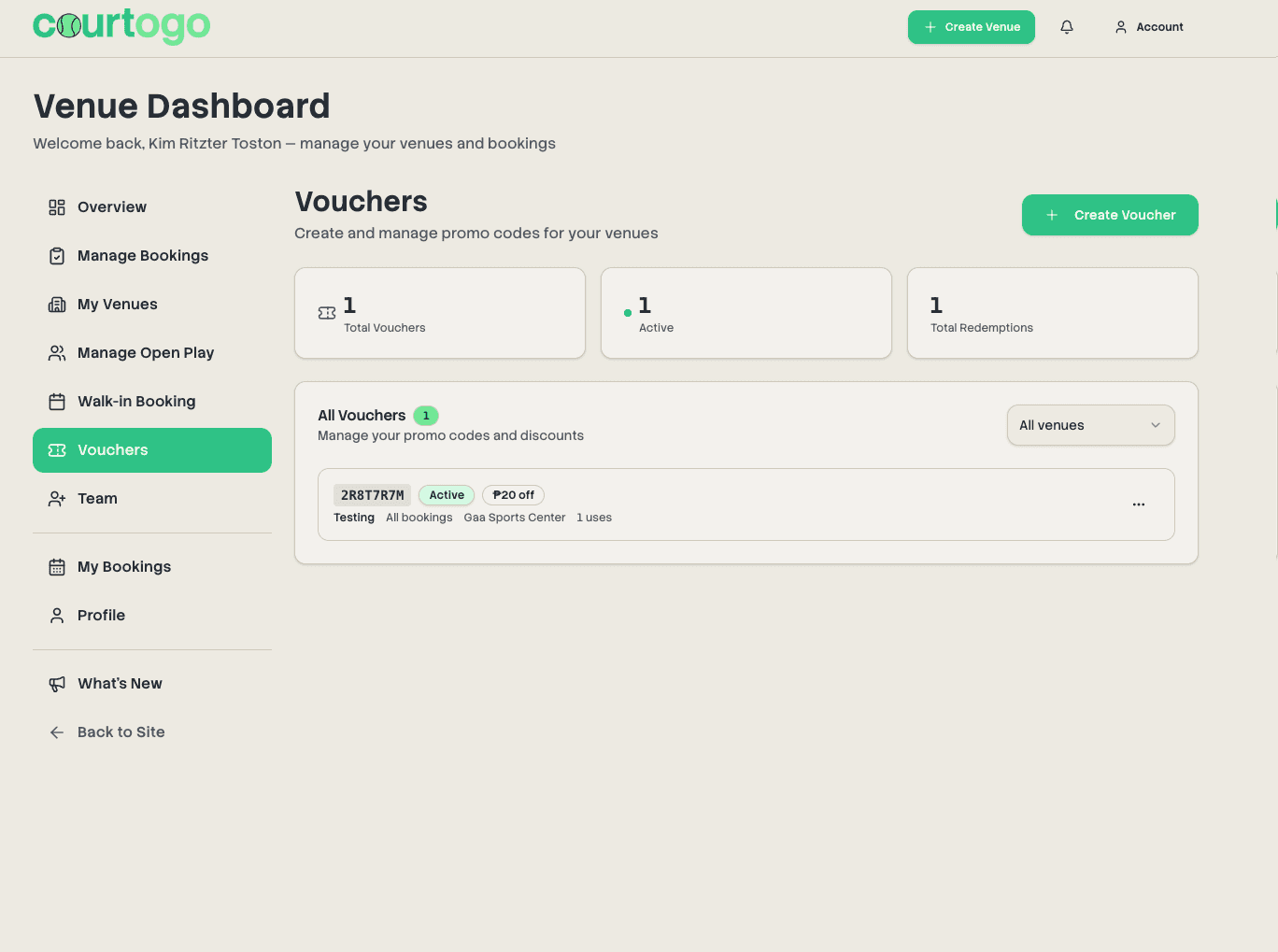
Venue owners can now create discount codes — percentage off, fixed amount off, or completely free bookings. Customers enter promo codes at checkout. Supports auto-apply vouchers, per-customer or total usage limits, date ranges, and per-court targeting.
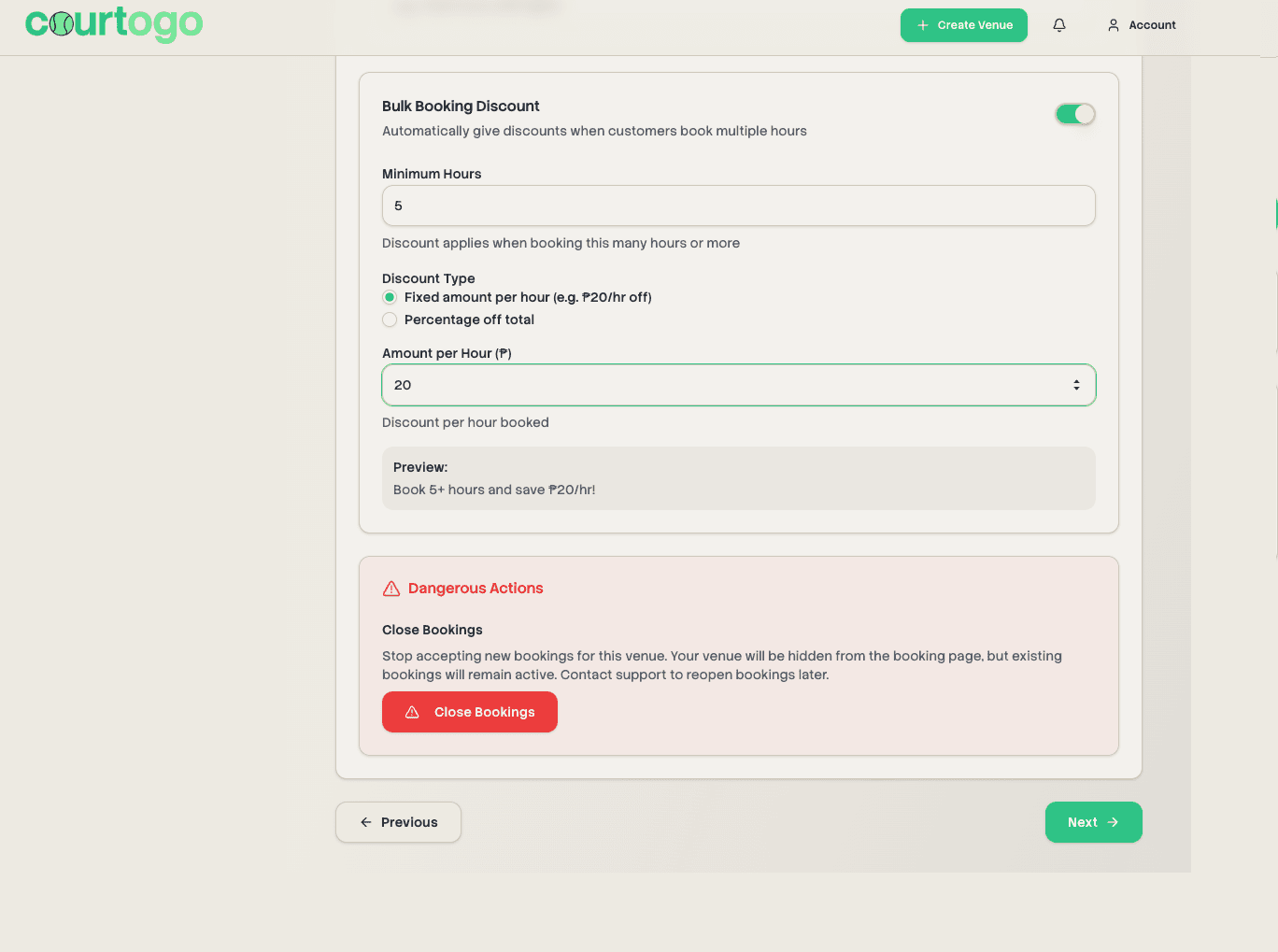
Bulk Booking Discount
New automatic pricing rule for venues: book a minimum number of hours and get a per-hour peso discount or a percentage off the total. Configured in venue settings and applies automatically at checkout — no code needed.
Flexible Start Times
For venues that open at :30 past the hour, customers can now toggle between :30-aligned slots (e.g. 12:30-1:30) and on-the-hour slots (e.g. 1:00-2:00) using a tab switcher above the booking grid. Cross-alignment conflicts are handled automatically.
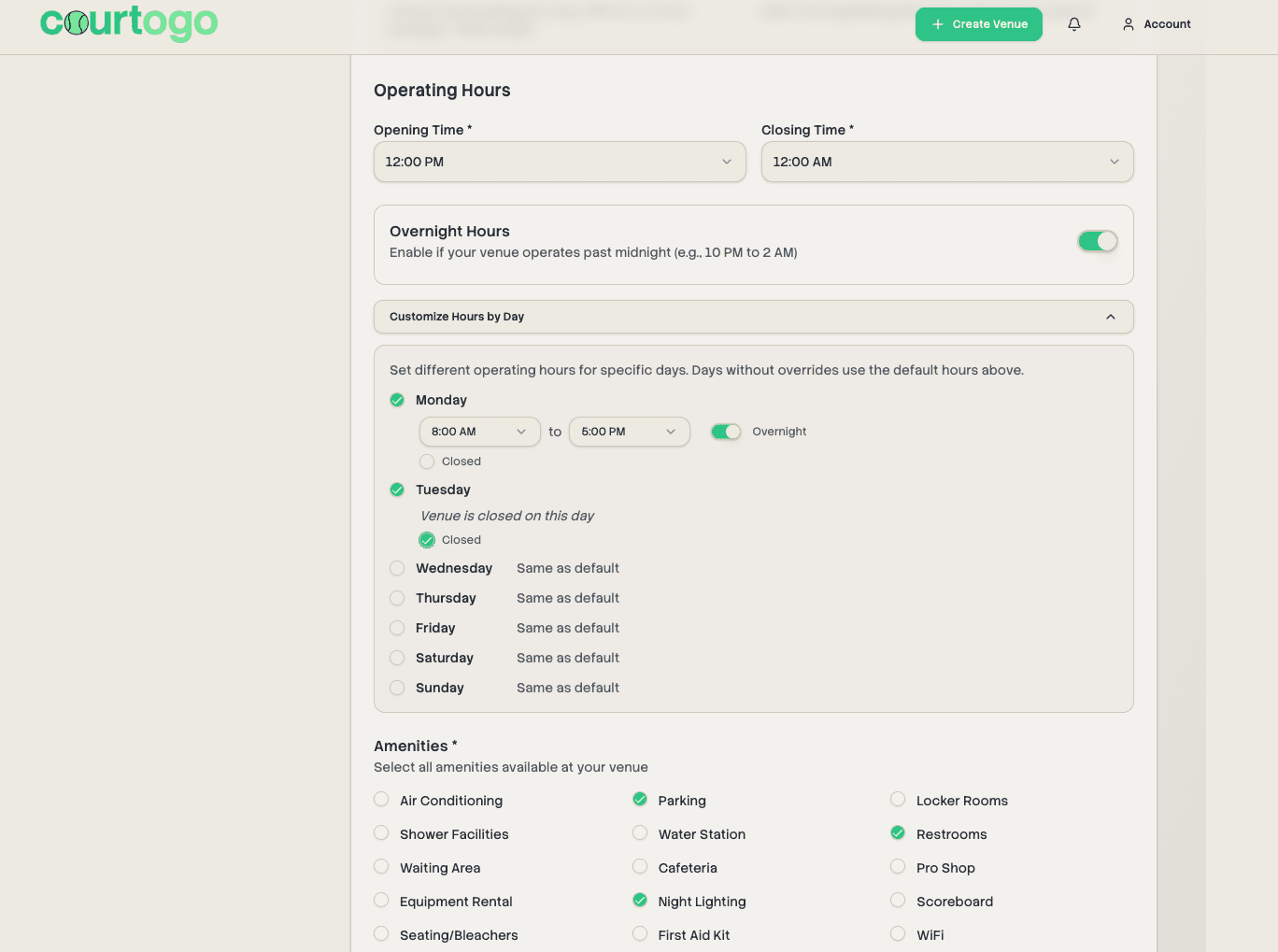
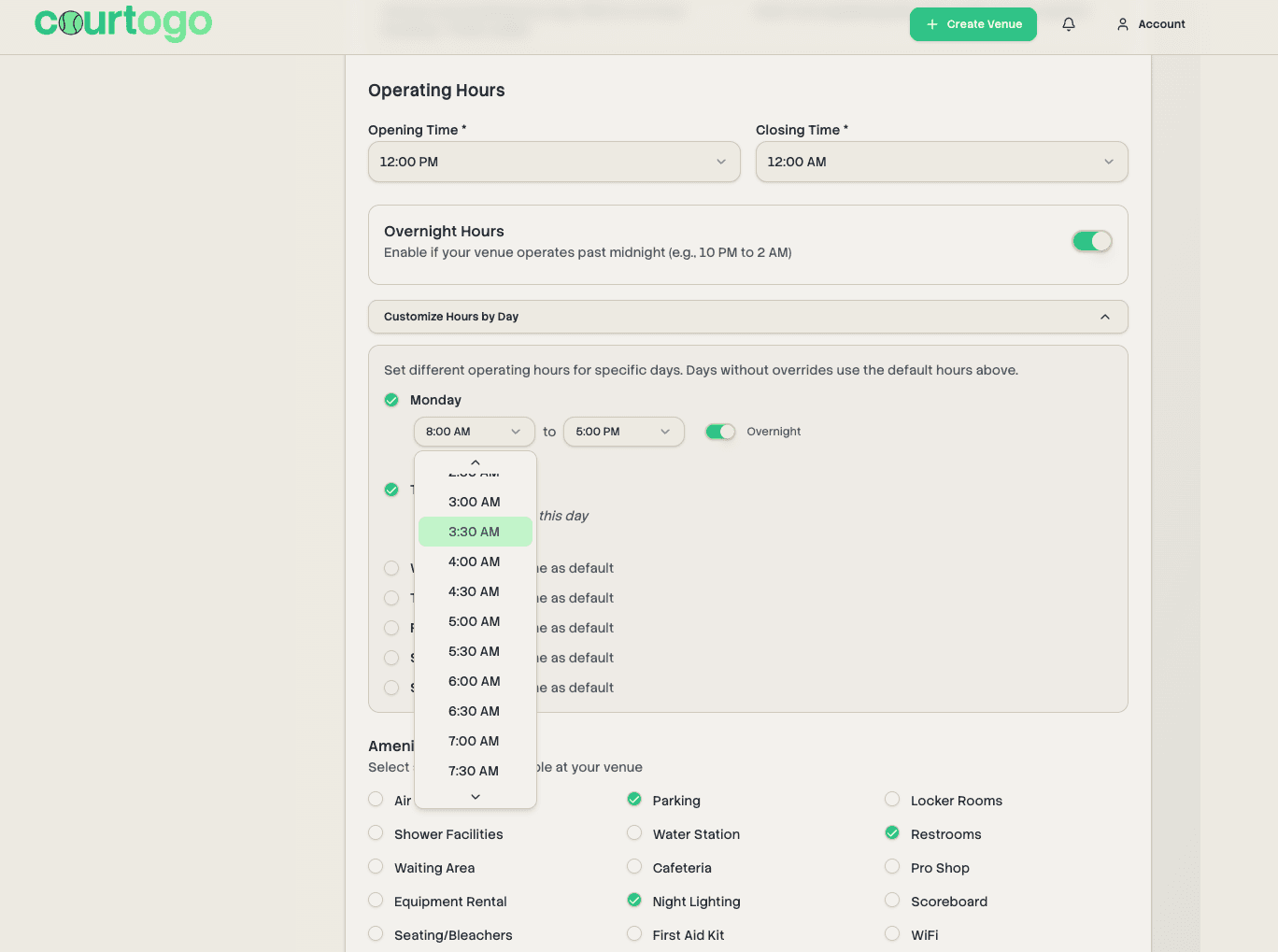
30-Minute Operating Hours & Per-Day Overrides
Venues can now set opening and closing times at :30 increments (e.g. 12:30 PM). Additionally, venue owners can customize operating hours for specific days of the week — perfect for venues with different weekday and weekend schedules.
Weekend & Holiday Peak Pricing
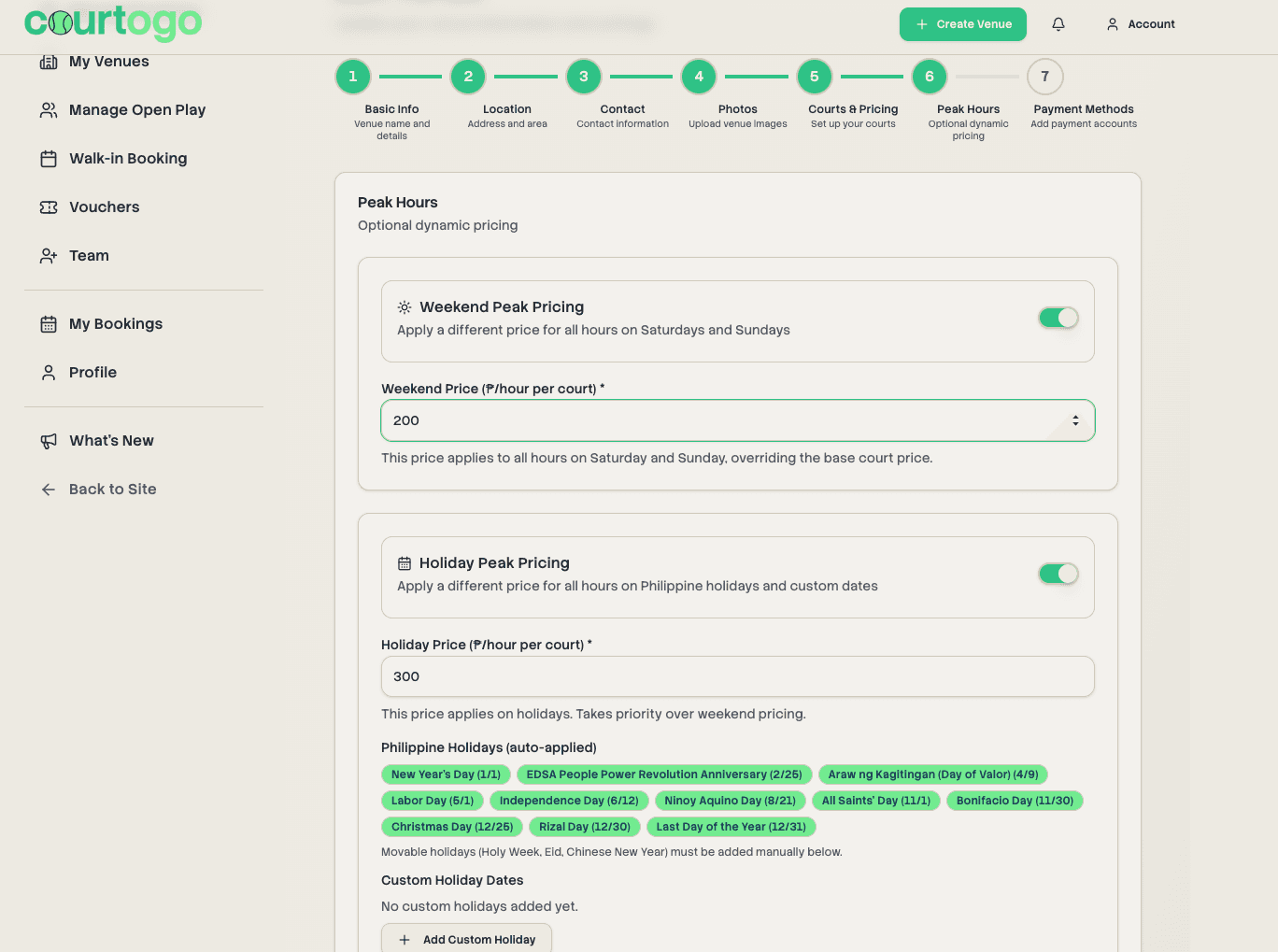
Venue owners can set a flat peak price that applies to all hours on Saturdays and Sundays, and separately for Philippine holidays. Includes support for adding custom holiday dates (e.g. Holy Week, local fiestas).
Consistent Venue Card Layout
The "View Details & Book" button now always appears at the bottom of venue cards regardless of content length, giving the venue listing page a cleaner, more uniform look.
Venue Description Line Breaks
Venue descriptions now properly render line breaks as entered by owners. The description text area in the venue form has also been enlarged for easier editing.
Auto-Confirm Payment Default Changed
The default for new venues is now set to manual confirmation. Venue owners who want automatic booking confirmation can opt in explicitly in their venue settings.
Mini Convenience Store Amenity
Added "Mini Convenience Store" as a new amenity option that venue owners can select when setting up their venue.
Have a feature request or found a bug? Let us know on Facebook